
AI pet videos that look like your pet
Many AI video tools start from a text prompt or a generic animal, so the pet on screen drifts away from yours. DreamPets starts from your photo: it reads your pet's face, coat colour and markings and keeps them in every scene. New dances are checked on real dogs and cats before they go live.
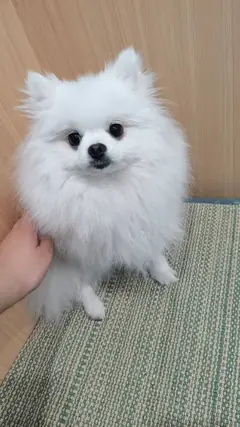
One photo of Puff, three videos
Why don't AI pet videos look like my pet?
A video model invents every frame. If all it knows is "a ginger cat", it draws a ginger cat, not yours, and small details drift as the pet moves: the exact coat colour, patches and stripes, eye colour, ear shape. Patterned coats like tabby, calico and tuxedo are the hardest to keep.
How does DreamPets keep my pet's look?
Your photo is the reference for the whole video, not just the first frame. Before each video, DreamPets describes your pet from that photo, including coat colour and markings, and writes it into the template. Templates are made for pets, and every new dance is checked on both dogs and cats before release.
Who uses DreamPets?
Across our apps, DreamPets has made about 10 million images and videos of more than 100,000 pets. The iPhone app is rated 4.6 on the US App Store (164 ratings) and the Android app 4.2 on Google Play (500 ratings), as of November 2026.
- 01
Pick a template.
Free ones are marked; PRO ones say PRO.
- 02
Add one clear photo of your pet.
Face in view, whole body for dances.
- 03
Wait a few minutes.
Half of dance videos are ready in under 5 minutes. It's saved in My creations.
Photos that keep your pet's look
- One pet, face in view, eyes and nose visible.
- Taken at their eye level, in soft, even light.
- Sharp, not blurry, and the original photo with no filters.
- For dances, the whole body in the shot.
Questions about pet likeness
Will the video look exactly like my pet?
It starts from your pet's real face and coat, so it's usually close. Results can vary from one video to the next. A clear, well-lit photo helps most.
Why did my pet's markings change in another app?
When a tool works from a short description instead of the photo itself, it fills in patches, stripes and eye colour on its own. DreamPets keeps your photo as the reference for the whole video.
Is it free?
Yes. On the web you get 3 free videos a day with the free templates, with no watermark. DreamPets PRO unlocks every template: on the web it's $5.99 a week, $29.99 a year or $59.99 once.
Does it work for cats?
Yes. Every new dance is checked on both dogs and cats before it goes live.
Keep making videos of the same pet
The DreamPets app saves your pet, so every new video starts from the same photos, plus a new video idea every day.